2.3 Managing Expectations & Being Consistent
On this page
- Triangle -Expectations Folder
1.1 Triangle
1.2 Expectations Folder - Following instructions
- Further instruction for independent work
3.1 Explicit instruction
3.2 Two Types of Tasks
3.3 Agenda – Do now – Learning Objectives - Compliments
3.1 Pitfall of compliments - Examples
- Summary
- Credits
‘Managing Expectations’ means that teachers make clear what they expect from their pupils.
Using the Triangle, I indicate whether I expect my pupils to pay attention or to start working on tasks.
Introduction video
For more information see our other introductory videos.
Current approach:
How do I currently make my expectations clear?
What information do I display on the board, and what do I communicate verbally?
Future approach:
How will I make my expectations clear to the class in the future?
Introduction
‘Managing Expectations’ is one of the three modules within the perspective ‘Establishing Fairness’ of Friendly and Fair Teaching (FFT).

Figure 27: Establishing fairness (overview)
Expectations are mutual: you state what you expect from pupils, and pupils know what they can expect from you. In this module, you will see how the Triangle clearly indicates transitions between different working formats. By phrasing expectations positively, you prevent pupils from doing exactly what you do not want.
Under ‘Practice Periode’, it is explained how to introduce the Triangle together with the ‘Framework‘ and ‘Behaviour Management Strategies‘ the first three lessons.
1. Triangle – Expectations folder
Below is a discussion of two tools used to make expectations clear to pupils.
The Triangle has two visuals that you display depending on the working format.
The Expectations Folder allows you to further refine your instructions.
1.1 Triangle
The Triangle provides a simple way to indicate what you expect from pupils for each working format. When starting a format, display the corresponding side of the Triangle. This keeps the interactive whiteboard free for other information.
Before letting pupils enter, place the Triangle clearly in view, showing the side that corresponds with the activity you are starting. This ensures your expectations are clear from the outset and gives you time to greet pupils at the beginning of the lesson—even when changing classrooms.
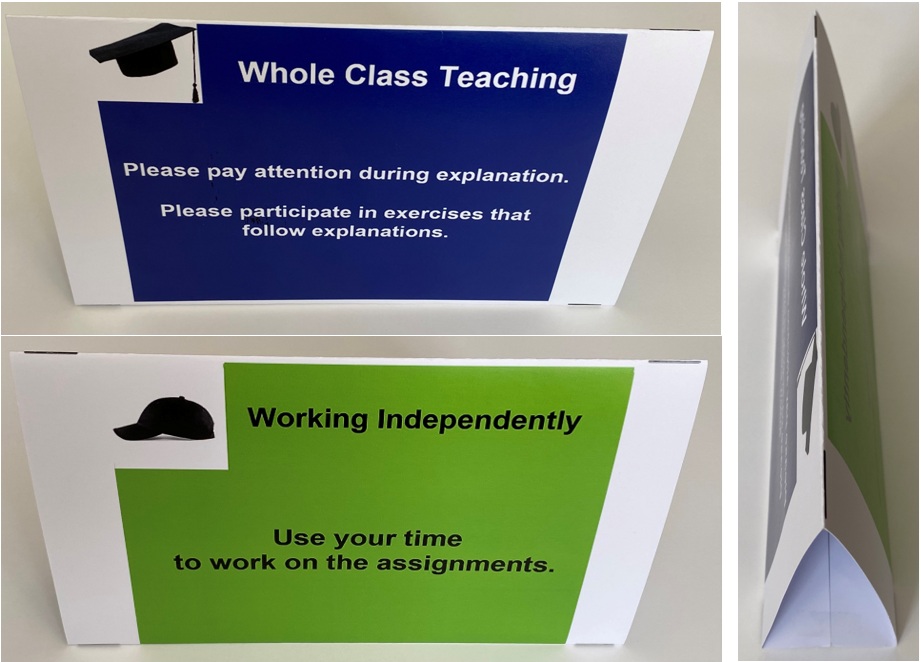
Figure: Triangle
How do you make a Triangle?
Print the pdf in colour on A3 paper, fold it into three sections, and secure the base with tape.
Customize the images below yourself using this PowerPoint.
1.2 Expectations folder
If you want to add more instructions beyond the two shown on the Triangle, use a display folder (tent-style stand). This folder contains clips where you can insert transparent sleeves with additional instructions.
Examples of additional instructions:
- Whole-class teaching: The teacher asks a question and selects a pupil to answer (no hands up).
→ Use this to check understanding of previous material. - Whole-class teaching: Introducing a new topic—if you know something about it, raise your hand.
→ Use this to activate prior knowledge. - Independent work: Work silently for the first 5 minutes, then quietly discuss after the timer.
→ Helps create a calm start. - Screens positioned visibly from the centre of the classroom.
→ Prevents pupils from playing games.
If the folded Triangle is sufficient, the folder is not necessary.
2. Following instructions
Stating expectations is only effective if you ensure pupils follow them.
Show this image when you are teaching the entire class:

Figure 17: Teaching the entire class
If a pupil is not paying attention or not participating, give a prompt:
“Please pay attention” or “Please take part in the exercise” (Reinforcing Positive Behaviour: First Steps).
Show this image when your students are working independently:
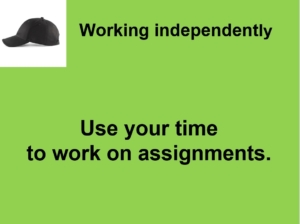
Figure 30: Working independently
During independent work, circulate and check whether pupils are working. Simply making eye contact is often enough to prompt action.
If a pupil still does not start working, say:
“Please get started.”
3. Further instruction during independent work
Providing structure during independent work helps to:
- ensure pupils use their time effectively
- encourage independent working
- maintain oversight of the group
- prevent immediate questions after starting
3.1 Explicit Instruction
This model helps provide clear instructions:
- What should you do? (Task content)
- How should you do it? (Approach)
- Help – where and how can you get support?
- Time – how long do you have?
- Outcome – what happens with the result?
- Finished – what do you do when you’re done?
If instructions are only given verbally, pupils often forget them. Therefore, also display a summary on the board or online.
3.2 Two types of tasks
Distinguish between:
- Closed tasks assessed via an app (quick feedback)
- Open tasks requiring more time for individual assessment
Before starting, give this instruction:
- “You are free to decide how you approach your work. I expect you to handle this responsibility appropriately.”
- “If you are working on core material and think you have mastered it, check this in the app first. If successful, show me and I will record your level.”
- “If you want a self-chosen topic assessed, complete a short form first.”
Assess pupils in the order forms are submitted.
3.3 Agenda – Do now – Learning Objectives
Use three magnets to display:
- Agenda
- Do Now
- Learning Objectives
4. Compliments
Give compliments preferably non-verbally (e.g. thumbs up).
Only give compliments for genuine achievement. Giving them too quickly may reduce effort.
4.1 Pitfalls of compliments
Compliments can have drawbacks:
- High-achieving pupils may feel pressure.
- Hard-working pupils may receive fewer compliments.
It is therefore better to value effort.
5. Examples
This video (recorded at Pieter Nieuwland College during a music lesson by Johan ’t Hart) demonstrates how enjoyable teaching can be with a cooperative group using FFT.
After 8 seconds: Pupils see expectations on the board at the start.
After 27 seconds: The teacher circulates and uses gestures to prompt pupils without disturbing the class.
After 56 seconds: The teacher gives instructions once everyone is seated and ready.
After 1:10: Pupils who followed instructions are allowed to begin.
Primary education
- Use board tools (e.g. sounds or music) as signals instead of speaking
- Set expectations tied to your own actions (e.g. sitting down)
- Use music to structure tidying up
- Start pupils working immediately upon entry
Secondary education
- Start work immediately after entry to reduce disruption
- Turn transitions into timed challenges
- Only begin explanations once the room is completely quiet
- Use non-verbal signals instead of raising your voice
6. Summary
- The Triangle makes expectations visually clear
- The Expectations folder allows further refinement
- Clarity helps pupils start work more quickly
7. Credits
| Eveline Busch – Bazalt | Introduced the term ‘Managing Expectations’ during a FFT course. |
| Mick O’Mahony | Emphasised that expectations are mutual: teachers clarify what they expect from pupils and what pupils can expect from them. |